
Vibe Coding for HR: A Beginner's Guide to Building Your Own Tools

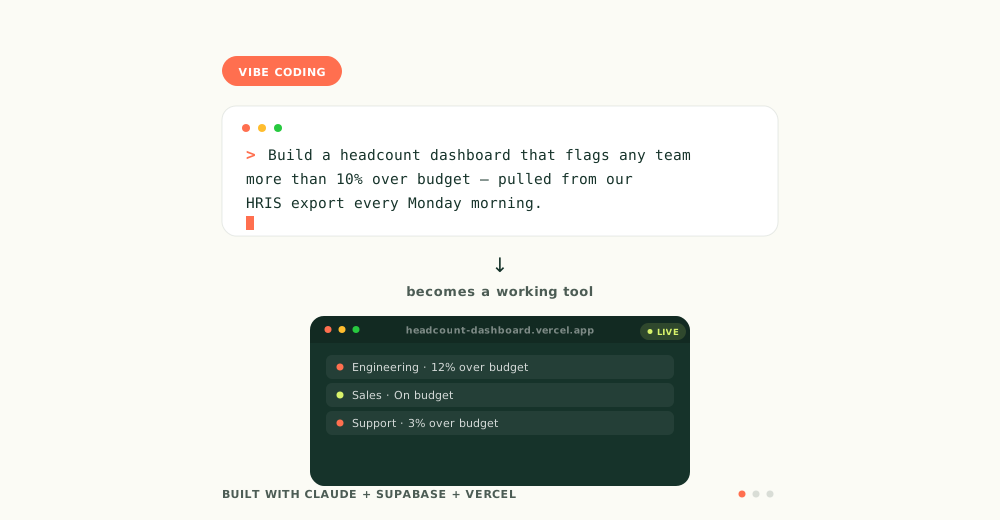
You've probably heard the term "vibe coding" by now — maybe from a LinkedIn post, maybe from someone in our community who built something over a weekend and hasn't stopped talking about it since. Here's the plain-language version: vibe coding means describing what you want to build in normal, everyday sentences, and letting an AI tool write the actual code for you. You're not learning to program. You're learning to direct.
For HR, this is a bigger deal than it sounds. We keep hearing the same story from people in our community: someone joins a startup with no enterprise budget, no IT department, sometimes no HR tech stack at all — and within a few months they've hit a wall so painful they just... built their way around it. A job requisition tracker that centralizes every recruitment request and approval in one place instead of scattered emails. An interview guide that keeps every panelist asking the same structured questions instead of whatever comes to mind. A people ops dashboard that finally answers "where are we on headcount" without a Friday afternoon spent stitching spreadsheets together. Nobody gave them permission to build these. They just noticed the gap and closed it themselves.
That's what this guide is about — not the theory of vibe coding, but what it actually takes to go from "I'm annoyed this doesn't exist" to a working tool.
What Vibe Coding Actually Is
Traditional software development means writing code line by line, understanding syntax and logic yourself. Vibe coding flips that: you describe the outcome you want in plain English, and an AI assistant generates the code, sets up the structure, and often deploys it for you. You review what it built, describe what needs to change, and iterate — more like directing a very fast, very literal new hire than writing software yourself.
Here's the part that doesn't get said enough: this is genuinely simple to start, but not simple to get right. Typing a sentence and watching a working app appear is the easy 20%. The other 80% — figuring out what the tool actually needs to do, catching the version that looks done but breaks the moment a real person uses it, deciding what happens to the data people put into it — that part still takes real thinking. This guide will get you started. It won't make that part disappear, and honestly, that part is what separates a fun weekend experiment from a tool your team actually trusts and keeps using.
Why This Matters for HR Specifically
Most HR tech problems aren't complicated from a logic standpoint. The people who've built things in our community weren't solving hard engineering problems — they were solving painfully specific, "we know exactly what we need and nobody else does" problems. A requisition app that centralizes every open role, request, and approval instead of chasing them down over email. A structured interview guide built around their own competencies, not a generic template. A dashboard that pulls the three numbers leadership actually asks for, instead of the twelve a vendor decided to include.
These are exactly the tools that used to sit at the bottom of an IT backlog forever, because they were never "big" enough to justify a developer's time. Vibe coding changes that math. If you can describe the problem clearly — and you can, because you live in it every day — you can now build your way out of it yourself.
The Stack: What You Actually Need
Think of it in four layers. You don't need to master all of them on day one, but knowing what each one does will save you a lot of confused Googling later.
1. The thinking layer — Claude (or ChatGPT)
Before you build anything, you plan it in plain conversation. This is where you figure out what your tool actually needs to do, what information it needs to collect, and how it should behave — talking it through like you would with a colleague, before any code gets written. Claude and ChatGPT both work for this stage.
2. The building layer — this is where you pick a path
This is the part that actually turns your description into working software. There are two reasonable starting points depending on your comfort level:
No-terminal path (recommended if you've never touched code): Tools like Lovable let you describe your app in a browser, and it builds and hosts it for you — no installation, no command line. This is the lowest-friction way to get something real and working fast.
Technical-curious path (what we've built our own tools on): Claude Code is a terminal-based tool that acts as an autonomous coding agent — you describe what you want, and it reads, writes, and edits your project's files directly. Steeper learning curve, but far more control. This is the path for people who want to go beyond a first version into something they'll keep building on long-term.
3. The memory layer — Supabase
Any tool that needs to save information — job requisitions, interview notes, headcount records — needs a database. Supabase is the default choice right now: it handles your database, logins, and file storage in one free-to-start service built to work smoothly with AI coding tools.
4. The "put it on the internet" layer — Vercel
Once your tool works, it needs to live somewhere the internet can reach it. Vercel is the most common hosting choice for these projects — connect it to your code, and it automatically publishes your site to a real URL, rebuilding it every time you make a change.
Optional but useful: GitHub, which stores a version-controlled copy of your project. You don't need it to get started, but it becomes valuable once you're iterating regularly or want a safety net.
Getting Started, Step by Step
- Pick your building tool. No coding background at all → start with a browser-based builder. Comfortable-ish with tech and want more control → Claude Code.
- Write down what you want in plain language before you touch anything. What does the tool do? Who uses it? What information does it need to collect or show? The clearer this is, the better your first result will be — and the more likely you are to catch the gaps before you're three features deep.
- Describe it to the AI tool exactly like you would to a new hire — specific, step by step, one feature at a time rather than everything at once.
- Run it, look at it, tell it what's wrong. This is the actual "vibe" part — you're iterating in conversation, not debugging code yourself.
- Once it works the way you want, deploy it so it has a real, shareable link.
One Thing Not to Skip
Before you use any vibe-coded tool for anything involving real employee data, ask your AI tool to review what it built for security issues — who can access the data, whether anything sensitive is exposed. It takes thirty seconds, and it's the difference between a tool you can actually trust with people's information and one you can't.
Where to Go From Here
Building your first working tool is genuinely exciting — and it's also just the start. Stay tuned for the next one in this series, where we get more specific.
One email a week. No fluff.
The frameworks, free tools, and product launches lean HR teams actually use — before anyone else hears about them.